Identity providers (OIDC)
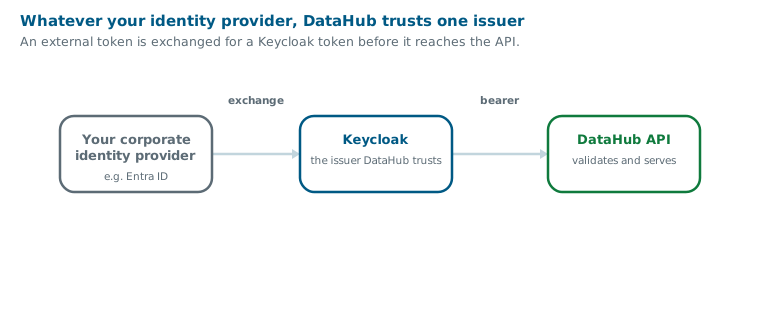
DataHub trusts exactly one issuer: Keycloak. That is a deliberate design choice, not a limitation, it keeps all authorisation logic in one place.
Other identity providers, including Microsoft Entra ID, are brought in through Keycloak rather than alongside it. Your users keep signing in with their corporate credentials; Keycloak is what turns that into a token DataHub accepts. The standard everything here speaks is OpenID Connect (OIDC), the sign-in protocol your corporate identity provider already uses.
Why Keycloak sits in the middle
The API validates every request against three things, and a raw token from a generic identity provider satisfies none of them:
| What the API requires | Why |
|---|---|
| A single known issuer | The token signature is validated against one configured Keycloak realm |
Roles in realm_access.roles | The baseline access roles, and the operator role DATAHUB_ADMIN |
A nested organization claim | This resolves which tenant the request belongs to |
That last one is the hard requirement. Without a tenant, there is no database to query, so a
token with no organization claim is rejected outright, no matter how valid it is otherwise.
Keycloak
What a realm needs
A working realm provides:
- A confidential client for the console, used for the browser sign-in flow. The console relays the signed-in user's access token straight to the API, so there is no separate token handling in the browser. Two of its settings point back at the console's own hostname, the one your users type rather than an internal address. The post logout entry is the one that is easy to forget: without it Keycloak refuses to send somebody who signs out back to the console, and answers Invalid redirect uri instead.
| Client setting | Value |
|---|---|
| Valid redirect URIs | https://<console-host>/login/oauth2/code/keycloak |
| Valid post logout redirect URIs | https://<console-host>/* |
- Realm roles, which gate the platform itself:
| Role | Grants |
|---|---|
DATAHUB_ACCESS | The baseline, required to use the API at all |
DATAHUB_CONSOLE | Required for every console page |
DATAHUB_CHAT | The console's AI assistant, in deployments and tenants where it is enabled |
DATAHUB_ADMIN | The operator escape hatch: read and write on every data set in every tenant |
-
An organization per tenant, using Keycloak's Organizations feature. Being a member of one is what puts the
organizationclaim in a user's token, and that claim is what resolves the tenant. -
Organization groups, which grant access to data sets: per data set, or across all of the organization's data sets through the wildcard groups
/datasets/*/readand/datasets/*/write. Data set permissions →Note that access and data permissions are separate. A user with
DATAHUB_ACCESSandDATAHUB_CONSOLEbut no data set grants can sign in and then see nothing: without a read grant every list comes back empty, and without a write grant nothing can be saved. It looks like a broken install and is actually a missing grant.
Users and tenants
A user's tenant is the organization they belong to, so one user belongs to one tenant. Membership is the whole mechanism: somebody who is not a member of their tenant's organization gets a token with no tenant in it, and the API rejects it.
Somebody who belongs to several organizations gets an ambiguous token, which the API rejects rather than guessing which tenant was meant. Access to two tenants means two identities.
Where organizations carry the tenant, clients must ask for one when they request a token, with
scope=openid organization:*, or organization:<alias> to pin one. Without that selector
there is no organization claim at all. (A realm that instead supplies the claim from a
mapper on the client needs no such scope; ask whoever runs your realm which applies.)
How organizations work →
Machine-to-machine access
Integrations and SDKs authenticate with the client-credentials grant, no user, no browser. The pattern is one client per tenant, because the tenant is bound to the client rather than passed at call time.
Each client needs two halves:
This is what mints the token.
Named service-account-<clientId>. A service account has no user profile of its own, so
organization membership is what gives its tokens a tenant.
The client must also request the organization scope, scope=organization:*, on every token
request. This applies wherever organizations carry the tenant, which is the normal setup.
Without the organization scope the token carries no tenant, and every API call fails with
401 invalid_token, which reads as a credentials problem and is not one. If instead the
credentials work and every call comes back empty, check that the service-account user is
an organization member.
Adding a tenant
Create the organisation, clone an existing tenant's client plus its service-account user, and make that user a member of the new organisation. Its id must match the new tenant's registry entry. Provisioning a tenant →
Organizations, each customer's own identity providers
Keycloak realms support organizations, and DataHub uses them as its tenants: one organization per tenant. An organization can also have its own identity providers, which solves the problem that each customer wants to authenticate against their own directory.
What an organization carries
| Tenant identity | One organization per tenant. A user's membership is what resolves their tenant |
| Identity providers | One or more per organization, so each customer brings their own Entra ID or other directory |
| Routing | Users are routed to the right provider by verified email domain |
| Membership | Authenticating through an organization's provider can grant membership automatically |
| Data set access | Groups inside the organization, see below |
So several different Entra ID tenants can be connected to one DataHub deployment at the same time, each belonging to its own organization, without a realm per customer.
Two rules worth knowing
- An organization may have several identity providers. Useful when one customer authenticates more than one way.
- An identity provider may belong to only one organization. This is a current Keycloak limitation, so you cannot link a single shared directory to many organizations and filter by email domain. Each customer needs its own provider entry.
Organization groups carry data set access
Organizations support groups, and group membership is what decides which data sets you
may read and write. Access is granted by putting somebody in the right group inside their
organization, named after the data set:
/datasets/<externalId>/read and /datasets/<externalId>/write. The wildcard pair
/datasets/*/read and /datasets/*/write grants the same across all of the
organization's data sets, so even all-data-sets access is delegated inside the tenant rather
than granted realm-wide.
Data set permissions →
Plan your data set boundaries with that in mind: they line up with organization groups, so a boundary that matches how you would group people is one you will not have to redraw.
Microsoft Entra ID
Entra ID is supported, but not by pointing DataHub at it directly.
An Entra token is rejected for three independent reasons: the issuer is Microsoft's rather
than your Keycloak, roles arrive as a flat top-level roles claim rather than in
realm_access.roles, and there is no organization claim at all.
So the Entra identity has to become a Keycloak identity first. There are two paths, depending on whether you are bringing in people or services.
For people, standard identity brokering
For interactive sign-in, configure Entra ID as an OIDC identity provider in Keycloak. Users authenticate against Entra with your existing single sign-on, conditional access and MFA policies, and Keycloak issues the DataHub token.
This is well-trodden Keycloak configuration. The work that is specific to DataHub is on the Keycloak side, and it is the part to plan for:
- Map Entra groups to the DataHub realm roles listed above. Entra app roles are not read by DataHub, authorisation comes entirely from the Keycloak realm roles and organization groups the brokered user ends up holding.
- Ensure every brokered user becomes a member of their tenant's organization. This is the step that is easy to miss, because sign-in will succeed and then every API call will fail.
The upside is that your joiner-mover-leaver process stays in Entra, where it already lives. Keycloak becomes a translation layer rather than a second place to manage people.
For services, the JWT authorization grant bridge
For a service principal registered in Entra ID, the bridge is Keycloak's JWT Authorization Grant (RFC 7523), a standard exchange in which one provider's signed token (a JWT) is presented to another and swapped for that provider's own. It is available in Keycloak 26.5 and newer. Keycloak accepts the Entra-signed token as that assertion and returns a Keycloak-issued access token.
The flow is three steps:
Client credentials against Entra's token endpoint, scoped to your application.
Present the Entra JWT as an assertion using the JWT bearer grant. Keycloak validates it against a configured identity provider and returns a Keycloak token.
With the Keycloak token as a bearer credential. Nothing in DataHub changes, it is still trusting exactly one issuer.
Each Entra service principal must be linked to a Keycloak user, which carries the realm roles and belongs to the tenant's organisation.
Two older approaches exist and should not be used. External-to-internal Token Exchange V1 is both preview and deprecated, and the V2 variant was removed in Keycloak 26.7, so on current versions the JWT Authorization Grant is the only supported route.
Sharp edges
These are the things most likely to bite, in roughly the order they bite:
| Symptom | Cause and fix |
|---|---|
| Audience error on exchange | RFC 7523 expects the audience to identify the Keycloak server; Entra sets it to your Application ID URI. Enable Allows Client ID as audience for assertions. This is the likeliest first failure. |
| Every assertion rejected as expired | Max allowed assertion expiration defaults to 5 minutes; Entra tokens live 60–90. Raise it past the Entra lifetime. |
| Second exchange looks like a replay | Entra serves the same cached token until it nears expiry, so Keycloak's one-time-use default rejects it. Enable Allow assertion reuse. |
| "User not found" on a correct-looking config | The federated link needs the service principal's Object ID, not the Application (client) ID. Easy to confuse. |
| New service principal cannot authenticate | There is no auto-provisioning. Every Entra service principal needs a matching linked Keycloak user, created manually. This is the main ongoing operational cost. |
| Granting an Entra app role changes nothing | Expected. Authorisation comes only from the linked Keycloak user's realm roles. |
Also budget for two secrets per service, an Entra client secret and the Keycloak grant client secret, both of which need rotation.
The Entra service-principal configuration is documented against the Keycloak 26.x documentation but has not been validated against a live Entra tenant. Treat the specific field names as a starting point, confirm them in the admin console, and expect the sharp edges above. The interactive-user brokering path is standard Keycloak configuration and is much lower risk.
Can Entra ID replace Keycloak entirely?
Yes in principle, and it is the harder road. Entra can be your only identity provider, but not with the platform as it stands, and the day-to-day administration is more work for the specific things DataHub needs. If you are choosing, understand what you are taking on.
Why it is a platform change, not a configuration
DataHub reads three things from a token: one trusted issuer, its roles in the place Keycloak puts them, and the organisation that decides which tenant the caller belongs to, in a nested form that Entra cannot be configured to produce. The last one is the real obstacle. Adopting Entra directly therefore means changing how the platform resolves a tenant, not just how a token is shaped, and that is development work on the platform rather than administration of it. The details are recorded in the platform repository for whoever takes it on.
What is genuinely harder to administer
Beyond the code, the ongoing work differs:
- Claims configuration is per application, edited through the app registration UI or its manifest, rather than centrally in one realm. Reshaping what a token contains is a developer-adjacent task, not an identity-admin one.
- Group and role limits are real. Group claims are capped in the token (200 in a JWT, including nested groups), so large directories need "groups assigned to the application" rather than "all groups", which is another thing to maintain per application.
- Service principals need per-principal setup. There is no auto-provisioning, and each new one is manual work.
- Two secrets per service in the bridged model, both needing rotation.
- Tenant mapping becomes Entra's problem. Today the mapping from a user to a DataHub tenant lives in one realm and is easy to inspect. Moved into Entra, it depends on whatever that directory can be persuaded to emit, and it is harder to audit.
Against that, Entra brings real advantages: it is very likely already your corporate directory, with conditional access, MFA and a joiner-mover-leaver process that is audited and staffed. That is not nothing, and it is the reason the bridged approach exists.
The recommendation
Keep Keycloak as the issuer and broker Entra behind it. Users authenticate against Entra with all your existing policy, and Keycloak does the small amount of claim shaping DataHub needs. You get the corporate directory and the required token shape without changing the platform.
Replace Keycloak outright only if Entra is becoming the primary identity source for many services and you are prepared to fund the platform changes above, in the API and again in the analysis service.
| Gains | One directory, no linked Keycloak users, no second secret, integrations talk to Entra directly |
| Costs | Development work on two platform services, which nobody has scheduled |
| Risk | Tenant resolution moves into whatever Entra can be persuaded to emit, and becomes harder to audit |
The honest threshold: not worth it for one or two service principals.
Evaluation defaults are not production
The evaluation stack ships a preconfigured realm with demo tenants, demo users and default client secrets so it starts without configuration. None of it should survive into production, replace the realm, the clients, the secrets and the users with your own. Before production →
- OpenID Connect
- OAuth 2.0
- JSON Web Token
- RFC 7523, the JWT authorization grant
- Keycloak
- Microsoft Entra ID documentation
- Entra ID optional claims, and the ten-extension limit
- Configuring group claims, and the token size limits
- App roles, and how they reach the token
- Access token claims reference
- Keycloak identity brokering
- Keycloak organizations, members, identity providers and groups
- Users and access: tokens, service accounts and access reviews
- Data set permissions: the groups and roles these providers must emit
- Organisations and tenants: what the organisation claim resolves to
- Security and compliance: the wider posture