Data sets
A data set is a container that groups related data into one project or domain, and it is also the unit of access control.
Deciding what goes in which data set is therefore also deciding who can see what. That makes data set boundaries worth ten minutes of thought before you create the first one.
What lives in a data set
Resources, time series, events and files all belong to a data set. A data set is the home for everything relating to one project, one source system, one site, or one team's area, whichever division fits how your organisation actually works.
Good examples, the same scenarios the console's guided tutorial uses:
- Valve pressure sensors, pressure measurements from valve actuators, subsea and topside, used for condition monitoring and maintenance planning
- Grid asset monitoring, monitoring data for transformers and breakers, used for reliability and predictive maintenance
- Production line quality signals, signals from a production line, used for traceability and defect reduction
- Smart building telemetry, IoT telemetry for temperature, CO₂ and occupancy
Note what these have in common: each names a coherent body of data with an identifiable owner and purpose. That is the test.
Creating one
Creating, editing or deleting a data set needs the all-data-sets write permission, which your administrator grants, so in practice this is a job for your tenant's administrator or data steward. Access to individual data sets never includes it, because changing a data set changes what existing grants cover. Data set permissions →
"Grid asset monitoring", not "Erik's project". The name outlives the project.
Suggested from the name by default, grid_asset_monitoring, and stored exactly as
written if you supply your own. Integrations refer to it, so it must never change.
Why →
Say what belongs in here and what does not. In six months this is what stops somebody putting unrelated data in it.
The Part of data set field links it under one or more existing data sets, useful for grouping related sets into a programme. Choose deliberately: this connection is set at creation and cannot be changed afterwards.
Seeing the time series in a data set
The data set section has a Time series tab. Click a data set in the list and the table fills with every time series belonging to it, including the series of its sub-data sets, their sub-data sets, and so on. A programme-level data set therefore shows the series of the whole family beneath it, which is the payoff for connecting data sets under others when you create them.
Each row also names the data set the series directly belongs to. That name is a link into the time series explorer, opened with the series selected and its surroundings drawn as a graph: the series, its data set, and the data sets above it, so you can see in one picture where in the hierarchy a series lives.
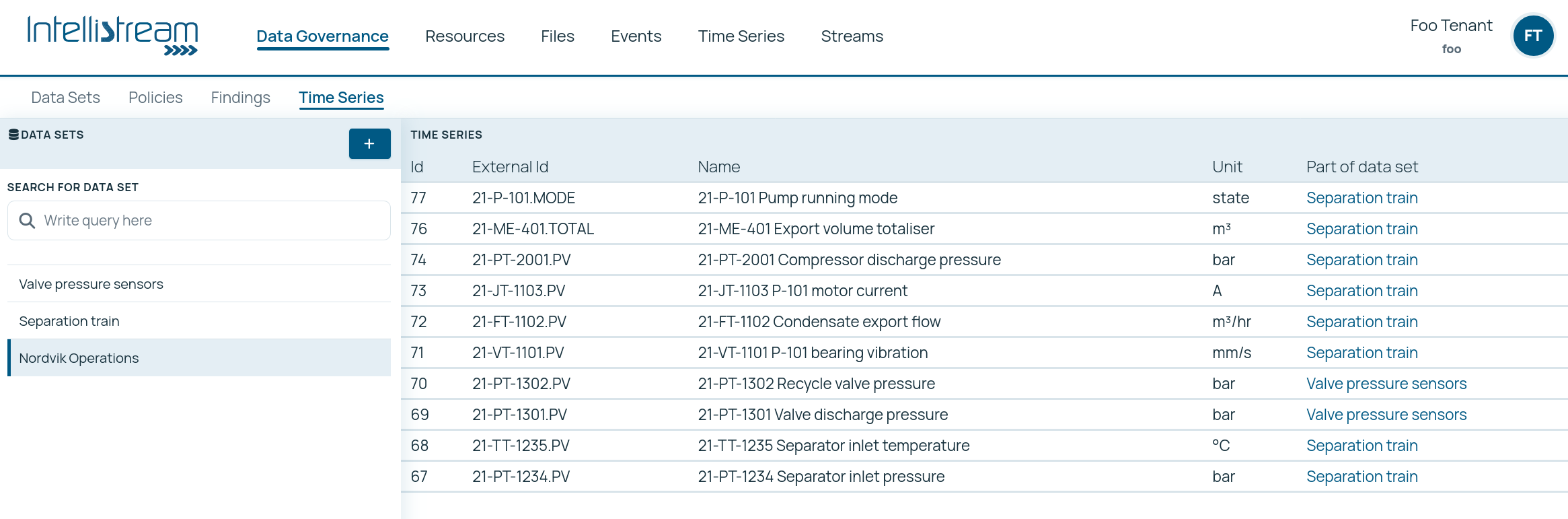
The table only ever shows series from data sets you can read. Anything outside your grants is left out silently rather than shown as an error. Data set permissions →
Designing good boundaries
Because permissions are granted per data set, the boundary decision is really an access decision, and it is the piece of data governance that data sets carry. Three practical rules:
Split by who should see it, not by what it is
If two bodies of data have the same audience, they can share a data set. If one contains commercially sensitive figures and the other does not, they must not, no matter how related the subject matter.
Aim for a handful, not hundreds
Every data set is a permission to grant and maintain. A site with eight data sets is manageable; one with 200 becomes an administrative burden that leads to over-broad grants, which defeats the purpose.
Keep a series with the thing it measures
Splitting an asset into one data set and its measurements into another means anybody who can see the asset cannot see its data, or vice versa. This is occasionally deliberate; usually it is an accident that produces confusing half-visible results.
Moving an entity to another data set requires write access to both the source and the destination, and it changes who can see it. Getting the split roughly right at the start is much cheaper than rearranging later.
Policies
Lifecycle, access and requirement policies are declarative records today, not enforcement. A data set can carry policies describing lifecycle or access intent, and they document what should happen, but nothing in the platform currently acts on them.
Read and write access comes entirely from the groups and roles in your identity provider. Data set permissions · Policies as a building block →
Each data set has a Policies tab, where the rules governing that data set, lifecycle, access, requirements, are recorded and read. They document intent today and will be enforced later. Policies in full →
One kind is enforced now. A naming policy fixes the shape of new external ids and is checked on every write. It is normally set once for the whole tenant, and a data set can override it where the records landing in that data set come from a source system with its own identifier scheme. An override replaces the tenant rule rather than adding to it. Naming policies →
The underlying grants are read and write, and they are independent: write does not imply read. That is deliberate, an ingestion service account can be allowed to write data without being able to read anything back.
Data sets and files
Files and folders also carry a data set. Setting the data set on a folder also applies it to everything inside that does not already have one, automatically rather than as an option, which is the quickest way to bring an uploaded document tree under the right access boundary, and worth knowing before you do it. Working with files →
What happens if data has no data set
Entities can exist without a data set, typically early in a project, or from an import that did not specify one. Resources, series and events without a data set are handled conservatively by the permission system, so in practice unassigned data of those kinds tends to be invisible until it is assigned. Files are the exception: a file or folder with no data set is readable by every authenticated user. Entities without a data set →
If data seems to be missing after an import, checking whether it landed without a data set is a good first diagnostic.
Where agents help
Mostly by not being given too much. An agent's reach is decided by the data sets its token can read, so the useful practice is to give it the narrowest set that lets it do its job. Note the one asymmetry: creating, changing or deleting a data set needs an all-data-sets grant, so most agents should not be able to, however useful their other work is. Data set permissions →
Where an agent does help is review: which data sets have drifted from their stated purpose, which hold members nobody has read in a year, and which are quietly empty. Building AI agents →
- Using MCP: the data sets an AI assistant can see are the ones its token can read
- Data governance: data sets as the access piece of governance
- Data set permissions: the groups behind read and write
- The four building blocks: where data sets sit among the concepts
- Working with files: data sets on folders and documents
- Data lifecycle: retention, which is also set per data domain