Events
An event is a record that something happened, at a point in time, to something specific.
Measurements are the steady signal. Events are the moments that matter, an alarm fires, a threshold is crossed, a maintenance job runs, a permit is closed. Because each event is anchored to the resources it concerns, it points straight at the affected equipment rather than at a tag string. Together they are the memory of a digital twin, the record of what has happened to each thing in it.
What counts as an event
Anything discrete and timestamped, from any source system:
| From | Examples |
|---|---|
| Control and monitoring | Alarms, threshold crossings, state changes, trips, mode switches |
| Maintenance | Work orders opened and closed, inspections, calibrations, overhauls |
| Safety and compliance | Permits raised and closed, isolations, incident reports |
| Commercial | Purchase orders, deliveries, contract milestones |
| IT and OT infrastructure | Deployments, alerts, incidents, configuration changes |
That breadth is the point. A work permit being closed, a purchase order being raised and a sensor alarm are structurally the same thing, so they land in the same log and are queried the same way, without anyone learning three source-system schemas. This is usually where the data liberation value shows up first.
The event log
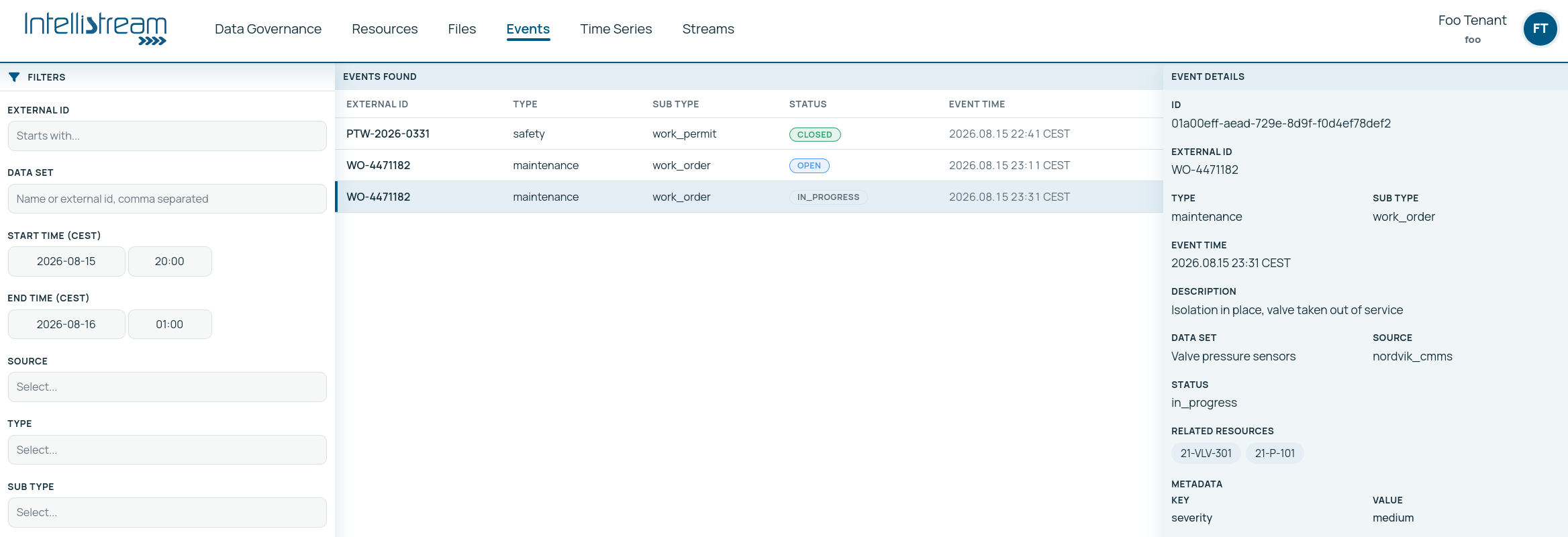
The Events section lists everything that has happened across your operation. Each entry carries an event time (stored in UTC, shown in your local time), a type, and the resources it concerns.
External ids on events
External ids behave differently here than on resources, and the difference is deliberate: many events share one external id. The id names the subject, the purchase order, the work permit, the batch, and every snapshot of what happened to it carries the same id, so "everything that has happened to order 4500171" is one indexed lookup rather than a metadata convention. The identity of an individual event is the platform's own event id; the external id is the thread its history hangs on.
Two consequences follow, and both are easy to be surprised by:
- No uniqueness is enforced, and none ever will be. Forcing it would push integrations into inventing a synthetic id per snapshot, or worse into editing events in place, which destroys the append-only history that makes the log worth having.
- Naming policies do not apply to events. A resource external id is a name your organisation chose; an event external id is the source system's key for the subject, so the platform does not impose a convention on it. If you set a strict convention expecting it to reach your event streams, it will not. The rest of the policy would be meaningless here anyway: events deliberately share ids, so uniqueness does not apply and a "near duplicate" is the normal case rather than an anomaly.
What does apply is the
permitted characters, the same on
events as everywhere else: letters, digits and the separators . _ : + = -, spaces and
non-printing characters refused, and whatever you send stored exactly as sent. A purchase order
keyed PO-4500171 in the source system is keyed PO-4500171 here.
The filter panel narrows by:
- External id prefix, the fastest route when you know roughly what you are looking for
- Time, start and end
- Source, which system the event came from
- Type, sub type and status, the classification your ingestion applied
- Metadata, one key/value pair
There is no filter by resource on this list yet: to see the events concerning a specific asset, open the event's details from the list, or start from the resource side. To empty the filters, clear the fields.
Event details
Click an event to open it. The detail view shows the event time, its type and sub type, its metadata, and the important part: the resources it concerns.
That list is what makes an investigation fast. An alarm does not just say "high vibration"; it points at the pump, from which you can reach the line it is part of, the process that line serves, the other equipment on it, and every measurement any of them emits. One click from "something happened" to "here is everything around it".
Events and time series together
This is the pairing that does the real work, and it runs in both directions. A series can produce an event, and an event explains a series.
The three are worth separating, because organisations usually record only the first:
| What was noticed | Who usually notices it | Why record it |
|---|---|---|
| A limit was crossed | The control system, immediately | The classic alarm. Already recorded almost everywhere, and already, often, too many of them |
| The pattern changed | A model watching the shape rather than the value | The interesting failures start here, weeks before a limit is anywhere near |
| The condition changed | Whoever, or whatever, made the change | Not a fault at all. It is the context that makes next month's readings interpretable |
The third row is the one most often skipped and the one people miss most, because without it a series changes character for no recorded reason and nobody remembers why.
Read the other way round, an event explains a series. A pressure trace that dips is ambiguous; the same trace with a maintenance event open on the upstream valve during the dip is an explanation. Because both the series and the event are anchored to resources in the same graph, matching one against the other is a query rather than a research project: narrow the chart to the window, then filter the event log to the same window and see what was open. Laying one directly over the other, events drawn onto the chart, is on the roadmap.
A practical investigation pattern:
Open the misbehaving series in Insights and narrow to the window where it went wrong.
Filter the event log by the time range, and by external id prefix or type where you can. Open a candidate event's details to see which resources it concerns. Most of the time the explanation is right there.
Use the resource graph to find what the asset connects to, and check events on those. Upstream equipment is usually the second place to look.
Relationship analysis ranks other series by how strongly they moved with yours, including which one moved first.
Each step is minutes rather than days, and each is reproducible by the next person.
Alarms
Alarms are events, and the home dashboard counts them separately because they are the subset people most want at a glance. Everything on this page applies to them: they carry a time, a type, metadata and the resources they concern, and once chart overlays land they will sit on a chart like any other event. If alarm volume itself is a problem, the discipline is alarm management, and an anchored event log is the raw material for it. New events, alarms included, can also be pushed to a person, a system or an agent the moment they land.
Where events come from
Events arrive from whatever integration feeds them, a control system's alarm handler, a maintenance system's change feed, a change-data-capture integration tailing a source database, or a script posting to the API. Two more producers are worth knowing about: a detection function turning a pattern in a continuous signal into a typed event, on the roadmap, and an agent raising one when it sees something operationally significant.
Events are the platform's historical record. They can be corrected or deleted by a caller with write access, so treat that as an administrative tool rather than a routine operation: an event log that gets edited loses its value as evidence. In normal use they are append-only, an audit trail, and they form the record that lineage leans on. An hourly figure that excluded a window because a maintenance event was open can show exactly which event, permanently.
The same property is what makes the log the accountability layer for agents: because actions and outcomes are recorded against the same resources, an agent's work is reviewable after the fact, and the incentive loop that steers a fleet of agents is computed from it. How agents are steered by the event log → The event log as an agent's fourth guardrail →
Where agents help
Events are where agents both read and write. They read them as the record of what happened, which is what turns a question into an investigation with evidence, and what makes your log a labelled training set for models.
They write them too: a detection agent raises a typed event when it sees something significant, and any agent that acts should record what it did as an event against the resources concerned. That habit is what makes agent work auditable afterwards. Building AI agents →
- The four building blocks: where events sit among the concepts
- Naming and standards: what an external id may contain, and why the naming policy stops at events
- Insights: charting the signals events explain
- The resource graph: navigating from an event to everything around it
- Change data capture: one way events arrive
- Data liberation: the value case for normalising events